Archive
BISQL # 98 – Introduction of Private Cloud with SQL Server and Hyper-V, Resource Link
Hi Friends ,
Today i thought of writing something on cloud w.r.t SQL Server, Now day moving on cloud is one of the most important requirement on every organisation.
We have discussed already lot on cloud related stuff , if you have missed can go through on that too in following links :
MSBI # 64 – Cloud # 1– MSBI Cloud Introduction,Need and Cloud on – Inforgrapics
In this article we are going to cover
- Why private cloud is required
- What re Private Cloud Drivers
- Resource Pooling
- Elasticity
- Self Service
- Control & Customize
- Resource
- Hyper-V is the best virtualization solution for SQL Server
- Licensing Cost Comparison – Microsoft and VMware
- Why Hyper-V is the best virtualization for SQL Server
Why private cloud is required
- 70% customers are doing/planning private cloud1 - In short after year or two every one will know power of cloud will use cloud for sure.
- Adoption of virtualization and cloud computing to increase dramatically in the next 12 months in all domains rapidly
- Self-services are catching up with virtualization quickly in real world now days
- What re Private Cloud Drivers
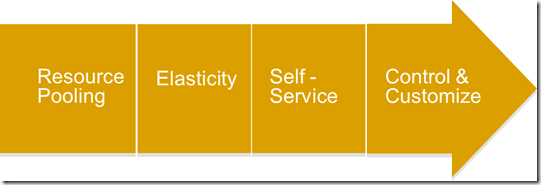
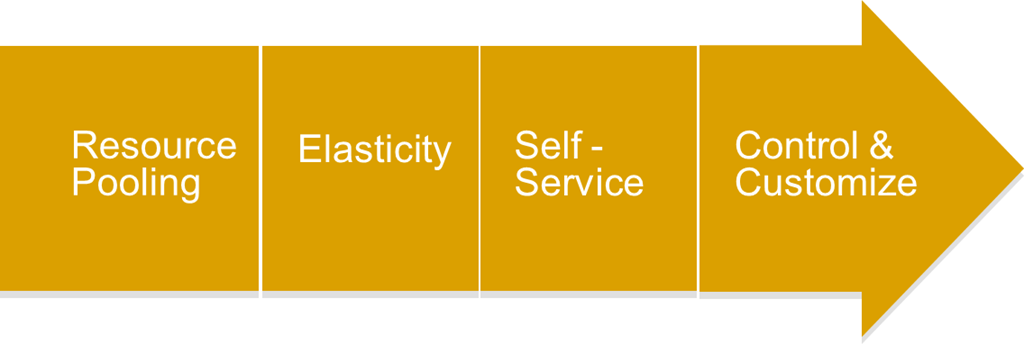
There are four main Drivers of private cloud right now
- Resource Pooling
- Elasticity
- Self – Service
- Control & Customize
Resource Pooling
With respect to Resource Pooling Following figure will represent steps, Tools and Features for Database consolidation:

Key points
- Understand Isolation/security/HA requirements
- Determine software edition, version, & hardware requirements
- Use Consolidation Planning Tool for SQL Server to understand resource requirements
- Upgrade using SQL Server Upgrade Advisor
- Migrate using SQL Server Migration Assistant
- Use P2V to keep existing settings
- Create new VM to combine multiple apps Benefits
- Reduce capital expenses – Standardize and consolidate
- Reduce operational expenses – Improve hardware utilization, Manage IT infrastructure efficiently
- Green IT – Reduce space and power needs Tools
- MAP toolkit 5.5
- Consolidation Planning Tool for SL Server
- System Center Virtual Machine Manager 2008 R2
- SQL Server Upgrade Advisor
- SQL Server Migration Assistant
Elasticity
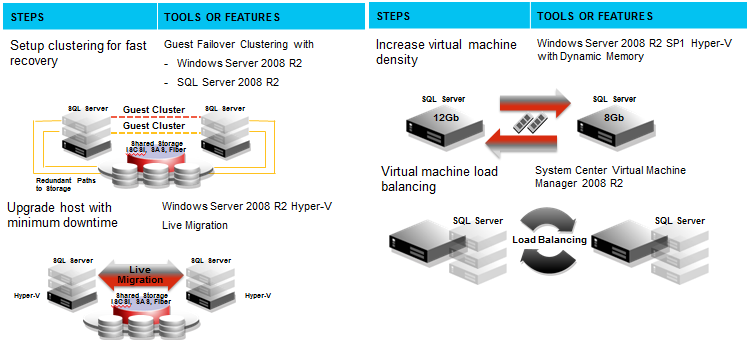
With respect to Elasticity in cloud following figure will represent steps, Tools and Features for Database consolidation:
Key Points
- IT develops VM templates
- Build and deploy SQL Server Sysprep templates
- Minimize planned downtime using Windows Server 2008 R2 Hyper-V Live Migration
- Manage unplanned downtime with Guest Failover Clustering
- Increase virtual machine density with Dynamic Memory
- Virtual machine load balancing with System Center Virtual Machine Manager 2008 R2 Benefits
- Greater agility – Handle peak load scenarios faster
- Dynamic Infrastructure – Scale to efficiently meet demands Tools
- Live Migration
- Dynamic Memory
- Guest Failover Clustering
- System Center Virtual Machine Manager 2008 R2
Self Service
With respect to Self service in cloud following figure will represent steps, Tools and Features for Database consolidation:


Key Points
- Leverage workflow service in SCVMM SSP 2.0
- Create & assign roles/permissions for business and IT admin
- Request and build business specific infrastructures (submit & approval)
- Map infrastructure to existing VM templates
- Create & retire VMs on-demand Benefits
- Faster time to market – Automation without compromising control
- Reduce administration overhead
- Business units can request resources on demand
- Tools
- System Center Virtual Machine Manager 2008 R2
- System Center Virtual Machine Manager Self Service Portal (SCVMM SSP 2.0)
Control & Customize
With respect to Control and Customization in cloud following figure will represent steps, Tools and Features for Database consolidation:

Key Points
- Pre-build infrastructure by IT based on company standard and policy
- Assign cost recovery model for each virtual machine templates
- Monitor usage by users through reporting
- Chargeback to users
- Monitor & troubleshoot entire stack using SCOM Benefits
- Enforce and standardize based on policies
- Measure service – Meter resource usage and charge back to business units
- Customize for your business needs Tools
- System Center Virtual Machine Manager 2008 R2
- System Center Virtual Machine Manager Self Service Portal (SCVMM SSP 2.0)
- System Center Operations Manager 2007 R2 Management Packs
Resource
Topic – Benefits on SQL Server consolidation/virtualization
Resource – (Why consolidate) as follows
- SQL Server 2008 R2 Consolidation Datasheet
- SQL Server 2008 Consolidation Whitepaper
- SQL Server 2008 R2 Virtualization Datasheet
- SQL Server 2008 R2 Licensing and web site
- Support policy for SQL Server virtualization
- SQL Server Consolidation Guidance Topic – Compare
Resource – Compare links are as follows
- Cost Comparison Calculator
- Hyper-V Calculator
- Why Hyper-V for existing VMware customers?
- Hyper-V vs. VMware operational cost comparison
- Hyper-V vs. VMware cost comparison white paper
- Hyper-V vs. VMware cost comparison video
- Hyper-V vs. VMware ongoing cost comparison
- Debunk VMware cost calculator from Taneja Group
- Hyper-V is the best virtualization for SQL Server Topic – Windows / Hyper-V
Resource – (How to Plan & Deploy)
- Windows Server Virtualization Guide
- Hyper-V VM Processor Compatibility Topic – Partner resources
Resource – (How to Plan & Deploy)
- SQL Server Consolidation on IBM x3850 servers
- NetApp SQL Server Consolidation/Virtualization Topic – Tools
Resource – (How to Plan & Deploy)
- Consolidation Planning Tool for SQL Server
- MAP Toolkit
- Offline Virtual Machine Servicing Tool 2.1 Topic – Plan & Deploy
Resource – (How to Plan & Deploy)
- Consolidation using SQL Server 2008
- SQL Server Virtualization with Hyper-V
- Managing SQL Server Virtual Appliances
- Analysis Services Consolidation Guidance
- Onboarding SQL Server Private Cloud Environment Security
- Hyper-V Security Guide HA
- Hyper-V Live Migration Architecture Resource Management
- Server Memory Options
- Affinity mask Option
- Resource Governor Whitepaper
- Managing SQL Server with Resource Governor
- Support Statement for Dynamic Memory in SQL Server Virtualization Manageability
- System Center VMM Self-Service Portal 2.0
- P2Vin System Center VMM
- Virtualization with Hyper-V
- How to: Extract a DAC Storage Requirements
- Data Compression Strategyfor SQL Server 2008
- SQL Server Compression Datasheet
- SQL Server Compression Whitepaper
- Unicode compression in SQL Server 2008 R2
- Pre-deployment I/O Best Practices
- Disk Alignment Best Practices for SQL Server Performance & Scalability
- SQL Server in Hyper-V Best Practice
- High Performance SQL Server on Hyper-V
- Virtual Hard Disk Performance White Paper
- Hyper-V R2 Performance By ESG
- Hyper-V R2 SP1 Workload Performance By ESG
Hyper-V is the best virtualization solution for SQL Server
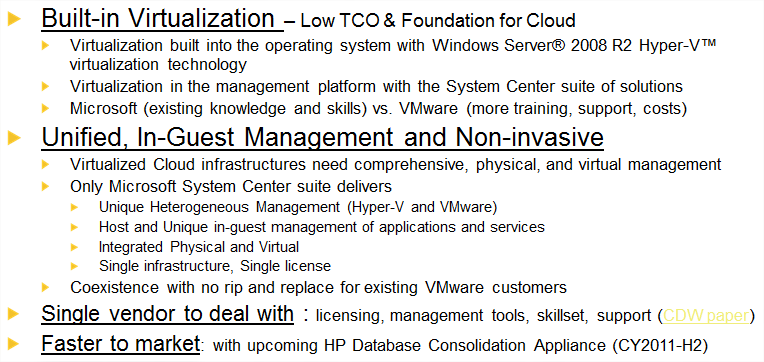
Licensing Cost Comparison – Microsoft and VMware
Following explanation is easy enough to understand all .

Why Hyper-V is the best virtualization for SQL Server
As we know in current market everyone has started steps towards Cloud computing and many of them already started using SQL server
Which as shown on stats

You may also interested in reading topics like
- MSBI #45 – SQL Server 2012 #1 – Now SQL Server ‘Denali’ is 2012 !
- BISQL # 51 : SQL Server Denali Feature # 2 – Sequence number –All Explanation !!
- BISQL # 53 : SQL Server Denali Feature # 3 – Always On (Concept ,Architecture)
- BISQL # 50 : SQL Server Denali Feature # 1- File Tables # 2 – Demo and Scripting
- BISQL # 49 : SQL Server Denali Feature # 1–File Tables #1 – Introduction & Theory
Hope you will like this post on Optimize SQL Server for Private Cloud.
If you really like reading my blog and understood at least few thing then please don’t forget to subscribe my blog.
If you want daily link and analysis or interesting link go to following website which will give @ your inbox please subscribe our following link resource blog :
For More information related to BI World visit my Mentalist Blog
Link Resource Blog >> Daily Interesting links
SQL Server Mentalist >> SQL Learning Blog
Business Intelligence Mentalist >> BI World
Connect With me on
| Facebook |Twitter | LinkedIn| Google+ | Word Press | RSS |
 SQL Server Mentalist