Archive
Archive for the ‘SQL Query’ Category
BI SQL # 280: Get all SQL Server instance information for at a glance
November 20, 2016
Leave a comment
Hi Folks,
In journey of creating Power BI dashboards for DBA I have created this most informative query, which can be useful for everyone.
This query will have most of your sql server instance level information.
This query can be sub part of my many of my SQL Script blog post – “300+ SQL Server Script for DBA and Dev”

In this post we are going to discuss “Get all SQL Server information ”in following points:
- Problem Statement of SQL Script:
- Description of SQL Script:
- SQL Script Output Column
- SQL Script Code
- SQL Script Output Screenshot
- User Level to execute
Problem Statement of SQL Script:
How to get all SQL Server instance information at a glance
Description of SQL Script:
This script is combination of many Sub SQL Script, But all output correspondence to one row
SQL Script Output Column

SQL Script Code
------------------------------------
DECLARE @image_path NVARCHAR(100)
DECLARE @startup_type INT
DECLARE @startuptype NVARCHAR(100)
DECLARE @start_username NVARCHAR(100)
DECLARE @instance_name NVARCHAR(100)
DECLARE @system_instance_name NVARCHAR(100)
DECLARE @log_directory NVARCHAR(100)
DECLARE @key NVARCHAR(1000)
DECLARE @registry_key NVARCHAR(100)
DECLARE @registry_key1 NVARCHAR(300)
DECLARE @registry_key2 NVARCHAR(300)
DECLARE @registry_key3 NVARCHAR(300)
DECLARE @IpAddress NVARCHAR(20)
DECLARE @domain NVARCHAR(50)
DECLARE @cluster INT
DECLARE @instance_name1 NVARCHAR(100)
DECLARE @CPUDetails NVARCHAR(100)

SET @instance_name = coalesce(convert(NVARCHAR(100), serverproperty('InstanceName')), 'MSSQLSERVER');

IF @instance_name != 'MSSQLSERVER'
	SET @instance_name = @instance_name
SET @instance_name1 = coalesce(convert(NVARCHAR(100), serverproperty('InstanceName')), 'MSSQLSERVER');

IF @instance_name1 != 'MSSQLSERVER'
	SET @instance_name1 = 'MSSQL$' + @instance_name1

EXEC master.dbo.xp_regread N'HKEY_LOCAL_MACHINE',
	N'Software\Microsoft\Microsoft SQL Server\Instance Names\SQL',
	@instance_name,
	@system_instance_name OUTPUT;

SET @key = N'SYSTEM\CurrentControlSet\Services\' + @instance_name1;
SET @registry_key = N'Software\Microsoft\Microsoft SQL Server\' + @system_instance_name +
	'\MSSQLServer\Parameters';

IF @registry_key IS NULL
	SET @instance_name = coalesce(convert(NVARCHAR(100), serverproperty('InstanceName')), 'MSSQLSERVER');

EXEC master.dbo.xp_regread N'HKEY_LOCAL_MACHINE',
	N'Software\Microsoft\Microsoft SQL Server\Instance Names\SQL',
	@instance_name,
	@system_instance_name OUTPUT;

SET @registry_key = N'Software\Microsoft\Microsoft SQL Server\' + @system_instance_name +
	'\MSSQLServer\Parameters';
SET @registry_key1 = N'Software\Microsoft\Microsoft SQL Server\' + @system_instance_name +
	'\MSSQLServer\supersocketnetlib\TCP\IP1';
SET @registry_key2 = N'SYSTEM\ControlSet001\Services\Tcpip\Parameters\';
SET @registry_key3 = N'HARDWARE\DESCRIPTION\System\CentralProcessor\0';

EXEC master.dbo.xp_regread 'HKEY_LOCAL_MACHINE',
	@key,
	@value_name = 'ImagePath',
	@value = @image_path OUTPUT

EXEC master.dbo.xp_regread 'HKEY_LOCAL_MACHINE',
	@key,
	@value_name = 'Start',
	@value = @startup_type OUTPUT

EXEC master.dbo.xp_regread 'HKEY_LOCAL_MACHINE',
	@key,
	@value_name = 'ObjectName',
	@value = @start_username OUTPUT

EXEC master.dbo.xp_regread 'HKEY_LOCAL_MACHINE',
	@registry_key,
	@value_name = 'SQLArg1',
	@value = @log_directory OUTPUT

EXEC master.dbo.xp_regread 'HKEY_LOCAL_MACHINE',
	@registry_key1,
	@value_name = 'IpAddress',
	@value = @IpAddress OUTPUT

EXEC master.dbo.xp_regread 'HKEY_LOCAL_MACHINE',
	@registry_key2,
	@value_name = 'Domain',
	@value = @domain OUTPUT

EXEC master.dbo.xp_regread 'HKEY_LOCAL_MACHINE',
	@registry_key3,
	@value_name = 'ProcessorNameString',
	@value = @CPUDetails OUTPUT

SET @startuptype = (
		SELECT 'Start Up Mode' = CASE
				WHEN @startup_type = 2
					THEN 'AUTOMATIC'
				WHEN @startup_type = 3
					THEN 'MANUAL'
				WHEN @startup_type = 4
					THEN 'Disabled'
				END
		)

DECLARE @xp_msver TABLE (
	[idx] [int] NULL,
	[c_name] [varchar](100) NULL,
	[int_val] [float] NULL,
	[c_val] [varchar](128) NULL
	)
DECLARE @Out NVARCHAR(400)

SELECT @Out = COALESCE(@Out + '', '') + Nodename
FROM sys.dm_os_cluster_nodes

DECLARE @memory_usage FLOAT,
	@cpu_usage FLOAT,
	@ConnectionCount INT

SET @memory_usage = (
		SELECT 1.0 - (available_physical_memory_kb / (total_physical_memory_kb * 1.0)
				) memory_usage
		FROM sys.dm_os_sys_memory
		)
SET @cpu_usage = (
		SELECT TOP (1) [CPU] / 100.0 AS [CPU_usage]
		FROM (
			SELECT record.value('(./Record/@id)[1]', 'int') AS record_id,
				record.value('(./Record/SchedulerMonitorEvent/SystemHealth/ProcessUtilization)[1]',
					'int') AS [CPU]
			FROM (
				SELECT [timestamp],
					CONVERT(XML, record) AS [record]
				FROM sys.dm_os_ring_buffers WITH (NOLOCK)
				WHERE ring_buffer_type = N'RING_BUFFER_SCHEDULER_MONITOR'
					AND record LIKE N'%<SystemHealth>%'
				) AS x
			) AS y
		ORDER BY record_id DESC
		)
SET @ConnectionCount = (
		SELECT COUNT(dbid)
		FROM sys.sysprocesses WITH (NOLOCK)
		WHERE dbid > 0
			AND len(hostname) > 0
		)

--and DB_NAME(dbid)='master' /* Open this line to filter Database by Name */
--Group by DB_NAME(dbid),hostname)
INSERT INTO @xp_msver
EXEC ('[master]..[xp_msver]');

WITH [ProcessorInfo]
AS (
	SELECT ([cpu_count] / [hyperthread_ratio]) AS [number_of_physical_cpus],
		CASE
			WHEN hyperthread_ratio = cpu_count
				THEN cpu_count
			ELSE (
					([cpu_count] - [hyperthread_ratio]) / ([cpu_count] / [hyperthread_ratio]
						)
					)
			END AS [number_of_cores_per_cpu],
		CASE
			WHEN hyperthread_ratio = cpu_count
				THEN cpu_count
			ELSE ([cpu_count] / [hyperthread_ratio]) * (
					([cpu_count] - [hyperthread_ratio]) / ([cpu_count] / [hyperthread_ratio]
						)
					)
			END AS [total_number_of_cores],
		[cpu_count] AS [number_of_virtual_cpus],
		(
			SELECT [c_val]
			FROM @xp_msver
			WHERE [c_name] = 'Platform'
			) AS [cpu_category]
	FROM [sys].[dm_os_sys_info]
	)
SELECT A.*,
	B.*,
	C.*,
	d.*,
	e.*
FROM (
	SELECT @domain AS 'Domain',
		serverproperty('ComputerNamePhysicalNetBIOS') AS 'MachineName',
		CPU_COUNT AS 'CPUCount',
		--	(physical_memory_in_bytes/1048576) as 'PhysicalMemoryMB',
		@Ipaddress AS 'IP Address',
		@instance_name1 AS 'Instance Name',
		@image_path AS 'Binaries Path',
		@log_directory AS 'ErrorLogsLocation',
		@start_username AS 'StartupUser',
		@Startuptype AS 'StartupType',
		serverproperty('Productlevel') AS 'ServicePack',
		serverproperty('edition') AS 'Edition',
		serverproperty('productversion') AS 'Version',
		serverproperty('collation') AS 'Collation',
		serverproperty('Isclustered') AS 'ISClustered',
		@out AS 'ClusterNodes',
		serverproperty('IsFullTextInstalled') AS 'ISFullText',
		@CPUDetails AS CPUDetails,
		CONNECTIONPROPERTY('Net transport') AS net_transport,
		CONNECTIONPROPERTY('protocol_type') AS protocol_type,
		CONNECTIONPROPERTY('auth_scheme') AS auth_scheme,
		CONNECTIONPROPERTY('local_net_address') AS 'Local Net' -- Adddress
		,
		CONNECTIONPROPERTY('local_tcp_port') AS 'Local TCP' --_port
		,
		CONNECTIONPROPERTY('client_net_address') AS 'Client Net' --_address
		,
		@memory_usage [Memory Usage],
		@cpu_usage [CPU Usage],
		@ConnectionCount AS ConnectionCount
	FROM sys.dm_os_sys_info
	) a,
	(
		SELECT @@SERVERNAME AS [Server],
			@@VERSION AS SQLServerVersion,
			@@ServiceName AS ServiceInstance,
			create_date AS ServerStarted,
			DATEDIFF(s, create_date, GETDATE()) / 86400.0 AS 'Days' --Days Running
			,
			(DATEDIFF(s, create_date, GETDATE())) / 60 AS 'Minutes' --Minutes Running
		FROM sys.databases
		WHERE NAME = 'tempdb'
		) b,
	(
		-- Script to get CPU and Memory Info
		SELECT cpu_count AS LogicalCPU,
			hyperthread_ratio,
			cpu_count / hyperthread_ratio AS PhysicalCPU
		FROM sys.dm_os_sys_info
		) c,
	(
		SELECT [number_of_physical_cpus] AS [Number of Physical CPU],
			[number_of_cores_per_cpu] AS CorePerCPU,
			[total_number_of_cores] AS TotalCore,
			[number_of_virtual_cpus] AS VartualCPU,
			LTRIM(RIGHT([cpu_category], CHARINDEX('x', [cpu_category]) - 1)) AS [cpu_category]
		FROM [ProcessorInfo]
		) d,
	(
		SELECT cpu_count AS [Logical CPUs],
			hyperthread_ratio AS [Logical vs Physical cores Ratio],
			physical_memory_kb / 1024 AS [Physical Memory in MB],
			committed_kb / 1024 AS [Committed Memory in MB],
			committed_target_kb / 1024 AS [Committed Target Memory in MB],
			max_workers_count AS [Max Workers Count],
			sqlserver_start_time AS [SQL Server Start Time],
			virtual_machine_type_desc AS [Virtual Machine]
		FROM sys.dm_os_sys_info WITH (NOLOCK)
		) e
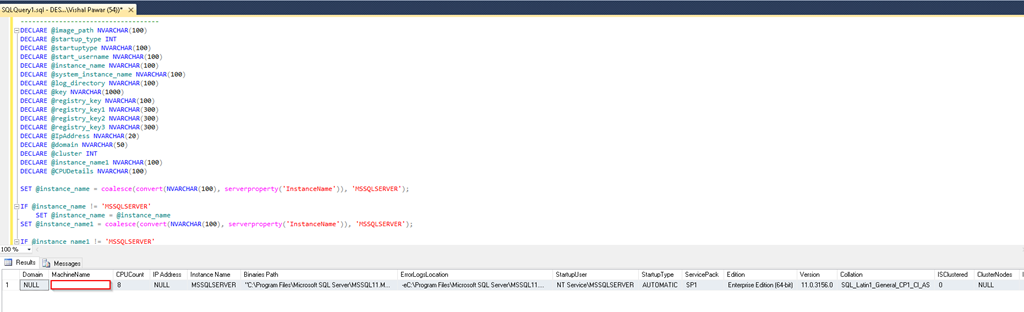
SQL Script Output Screenshot
User Level to execute
500
Hope you will like How to Find TOP IO Stored Procedure.
If you really like reading my blog and understood at least few thing then please don’t forget to subscribe my blog.
Connect With me on
Categories: Free Tool, Link, Optimization, Script, SQL, SQL Query, SQL Server 2016, SQL Tips, SQL Tips and Tricks, SQL Tricks, TSQL, Vishal Pawar
 SQL Server Mentalist