BISQL # 100 – SQL Server with Spatial Data–Opportunity, Use, New Features and Example with few Queries
Hi Friends,
I can’t imagine this is my 100th post in SQL Mentalist Blog. We will have review post for this all 100 SQL post, Thanks to all my readers, Subscribers and well-wisher’s.
In this blog information / Discussion we are going to review one of the Teched 2012 of presentation :
Taking Microsoft SQL Server into the World of Spatial Data Management of Michael Rys
In this article we are going to cover following topics for Spatial Data in SQL server
- What are Business opportunity with Spatial Data in SQL server
- Where we can use Spatial Data (In real world Business Scenarios )
- What is Spatial Data ?
- What are new features Introduced in SQL Server 2012
- Featured New Type Features in SQL Server 2012
- How to create spatial Object
- What is Comprehensive Spatial Support
- What are Spatial format and example
- How to Load Spatial Data?
- Resource for Spatial Data
- Author Details for your direct querying
- What are Business opportunity with Spatial Data in SQL server
Increased user-sophistication with use Spatial Data
- More data sources
- More kinds of data
- Integrated systems and mash-ups We can integrate special Data by using More data sources with different data and form powerful analysis reports.
Ubiquitous geographical technology
- GPS
- Online mapping services
- Availability of geographical data
Where we can use Spatial Data (In real world Business Scenarios )
- Real-estate development and analysis
- Customer-base management and development
- Environmental-related data impact, analysis, and planning
- Financial and economic analysis in communities
- Government-based planning and development analysis
- Market segmentation and analysis
- Scientific research study design and analysis


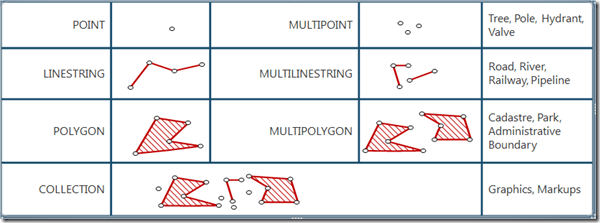
What is Spatial Data ?
- POINT
- MULTIPOINT
- LINESTRING
- MULTILINESTRING
- POLYGON
- MULTIPOLYGON COLLECTION Following image will help you more :

What are new features Introduced in SQL Server 2012
Circular arcs segments
- CircularStrings
- CompoundCurves
- CurvePolygons
All methods support circular arcs


Circular arc support on a ellipsoid
- Red – CircularString with 4 points
- Yellow – LineString with the same 4 points
Featured New Type Features in SQL Server 2012
- New relational methods added to geography-To match geometry
- Invalid objects are accepted for geography-Make Valid will convert them to valid objects
- Bigger than a hemisphere objects for geography-FULLGLOBE spatial object is available,“small” holes can be created
- Increased precision from 27 to 48 bits
for spatial computations - Persisted computed columns of a spatial type
- Spatial Aggregators
- New Index features
- How to create spatial Object
>>My GPS position is (@lat, @lon)
declare @g geography = geography::Point(@lat, @lon, 4326);
>>Get a region of 20m around me
declare @region geography = geography::Point(@lat, @lon).STBuffer(20);
>>Get all stores within distance X
select * from Stores s
where s.geo.STDistance(@me)<@x
>>Get all stores inside a city X
select * from Stores s
where s.geo.STIntersects(@myCityBoundary)=1
Try this on your SSMS
--My GPS position is (@lat, @lon)

declare @g geography = geography::Point(@lat, @lon, 4326);

--Get a region of 20m around me

declare @region geography = geography::Point(@lat, @lon).STBuffer(20);

--Get all stores within distance X

select * from Stores s

where s.geo.STDistance(@me)<@x

--Get all stores inside a city X

--select * from Stores s

where s.geo.STIntersects(@myCityBoundary)=1
What is Comprehensive Spatial Support
We can say geography data and geometry data is interrelation between actual reality and representation of same as follows :

What are Spatial format and example
- Well-Known-Binary
- Well-Known-Text
- GML With there respective example
Well-Known-Binary:
0x0103000000010000000500000000000000004CDDC000000000004C0D4100000000004CDD4
000000000004CDD4000000000C07A104100000000004CDD400000000000BD0F410000000000
88134100000000004CDDC000000000004C0D41
Well-Known-Text:
‘POLYGON(( -30000 240000, 30000 30000, 270000 30000, 260000 320000, -30000 240000))’
GML:
<Polygon xmlns="http://www.opengis.net/gml">
<exterior><LinearRing><posList>
-30000 240000 30000 30000 270000 30000 260000
320000 -30000 240000
</posList></LinearRing></exterior>
</Polygon>
How to Load Spatial Data?
With help of following way we can load spatial data
Shape2SQL
- Download from SharpGIS.net
- Built using the redistributable spatial library.
- WPF project using the Builder API
- Does not need to be on the same machine as the database instance
MapPoint Add-in for SQL Server
- Free download
- Needs Microsoft MapPoint (Free Trial available)
SAFE FME
- Commercial grade, lots of options
ESRI ArcGIS
Pitney Bowes EasyLoader
Resource
- http://www.slideshare.net/MichaelRys/sqlbits-x-sql-server-2012-spatial
- http://www.slideshare.net/MichaelRys/sqlbits-x-sql-server-2012-spatial-indexing
- http://social.technet.microsoft.com/wiki/contents/articles/9694.tuning-spatial-point-data-queries-in-sql-server-2012.aspx
- http://social.msdn.microsoft.com/Forums/en-US/sqlspatial/threads
- http://blogs.msdn.com/b/edkatibah/
Author Details for your direct querying

Hope this helps !!
Those who have not ye subscribe my Blog yet they can subscribe it !So that I can post you @ real time and all sort of knowledge in your mail without Zero spamming !!
Happy Learning and Sharing !!
If you want daily link and analysis or interesting link go to following website which will give @ your inbox please subscribe our following link resource blog :
For More information related to BI World visit my Mentalist Blog
Link Resource Blog >> Daily Interesting links
SQL Server Mentalist >> SQL Learning Blog
Business Intelligence Mentalist >> BI World
Connect With me on
| Facebook |Twitter | LinkedIn| Google+ | Word Press | RSS |
 SQL Server Mentalist