
April 26, 2013 8:26 am
Hi all
This is to inform you SQL PraRup have completed 100’s Download in 5 Day.
If you not used yet this too , Download and Use this powerful formatting tool which gives us feature’s like



Following is screen Shot from our codeplex website for SQL PraRup
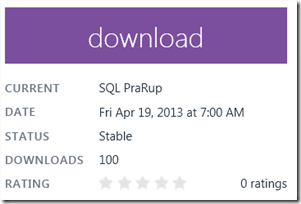

Also lot of users are really visiting to our help and presentation pages , following page views activities


This pages and there links are also as listed below
Hope you will surely Download this tool , Please send us review for further updates and Changes !
For More information related to BI World visit my Mentalist Blog
- SQL Server Mentalist >> SQL Learning Blog
- Business Intelligence Mentalist >> Business Intelligence World
- Microsoft Mentalist >> MVC,ASP.NET, WCF & LinQ
- MSBI Mentalist >> MS BI and SQL Server
- DBA Mentalist >>Advance SQL Server Blog
- MVC Mentalist >> MVC Learning Blog
- Link Mentalist >> Daily Best link @ your email
- Infographics Mentalist >> Image worth explaining thousand Words
- Hadoop Mentalist >> Blog on Big Data
Connect With me on
| FaceBook |Twitter | linkedIn| Google+ | WordPress | RSS | About Me |
Posted by Vishal Pawar
Categories: Free Tool, Microsoft SQL Server, MSBI, New blog, Query, Script, SQL, SQL Mentalist, SQL PraRup, SQL Tips, SQL Tips and Tricks, SQL Tricks, Technology,, TSQL, Vishal Pawar
Tags: SQL, SQL Server 2012, Vishal Pawar
Mobile Site | Full Site
Get a free blog at WordPress.com Theme: WordPress Mobile Edition by Alex King.

Hi Vishal,
I am getting following error:
A network-related or instance-specific error occurred while establishing a connection to SQL Server. The server was not found or was not accessible. Verify that the instance name is correct and that SQL Server is configured to allow remote connections. (provider: SQL Network Interfaces, error: 26 – Error Locating Server/Instance Specified)
I am trying to connect to remote sql server.
I am running internal desktop vb.net application on one machine which access sql server database of through LAN.
Can you help me out with this?
By Yogi on May 22, 2013 at 3:20 pm
SQL User password is wrong !
By Vishal Pawar on August 22, 2013 at 3:26 pm