
September 23, 2011 7:23 pm
Hi friends
After a week I am blogging on SQL Server Blog.
I have already provided blogs on time as follows
BISQL # 3 :Time and Date Query code and Analysis Part –I
Hope I will be regular from onwards !!
In this article we will just see few conversation of date time .
Problem : I have given a Integer number I Just need to convert this in to current Date
Solution: There are n number of solution for this problem but I will explained shortest and longest one
1.Longest Solution
In this I don’t know any of the Date time function where I just know Sting and integer
Here is simple code
Declare  @MyDate datetime = GETDATE()
Declare @IntPart int = 15
Declare @Monthpart nvarchar(3) = (Datename(month,@MyDate))
Declare @Yearpart nvarchar(4) = (Datename(YEAR,@MyDate))
Declare @WString nvarchar(15)
= @Monthpart+ ' '+ Convert (nvarchar(2),@IntPart) +' ' + @Yearpart

PRINT @MyDate
PRINT @IntPart
PRINT @Monthpart
PRINT @Yearpart
PRINT @WString
Output of above code is
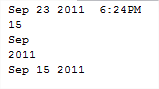
2.Shortest Solution
Its So simple just need to use DATEADD
Declare  @MyDate datetime = GETDATE()
Declare @IntPart int = 15
(select DATEADD(DD,@IntPart,@MyDate))
Output is as simple as above output
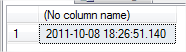
So here I just need to tell you the solution is always achievable even if you know datetime Function or don’t know it !!!
We will surely have series of post on time as data type !!
Hope this helps !!
If you really like reading my blog and understood at lest few thing then please don’t forget to subscribe my blog
If you wan daily link and analysis or interesting link go to following website which will give @ your inbox please subscribe our following link resource blog
Where todays links are
Dactylonomy of Web Resource >> Link Resource # 25: Sept 12–Sept 24
Posted by Vishal Pawar
Tags:
Mobile Site | Full Site
Get a free blog at WordPress.com Theme: WordPress Mobile Edition by Alex King.